SAMR Model: What It Is, Levels and Examples of ICT Integration in the Classroom
Introduction to the SAMR Model
Technology is part of everyday life in many schools in Spain. Interactive displays, computers, tablets and digital applications offer new ways to teach and learn. Yet having all these resources does not guarantee that their full educational potential is being used.
How can we tell whether technology is improving an activity or simply replacing a traditional resource with a digital one?
The SAMR model provides a framework for analysing how technology is integrated into education and what opportunities there are to improve teaching and learning.
Through four levels, this model helps us reflect on the use of technology in the classroom, from replacing conventional tools to designing new learning experiences.
For teachers and ICT coordinators, understanding the SAMR model can help with designing activities, identifying training needs and making better informed decisions about integrating ICT in schools.
In this article, we explain what the SAMR model is, its four levels and how to apply it through practical classroom examples.
What is the SAMR model?
The SAMR model is a conceptual framework developed by educator and researcher Ruben R. Puentedura to analyse how technology is integrated into education.
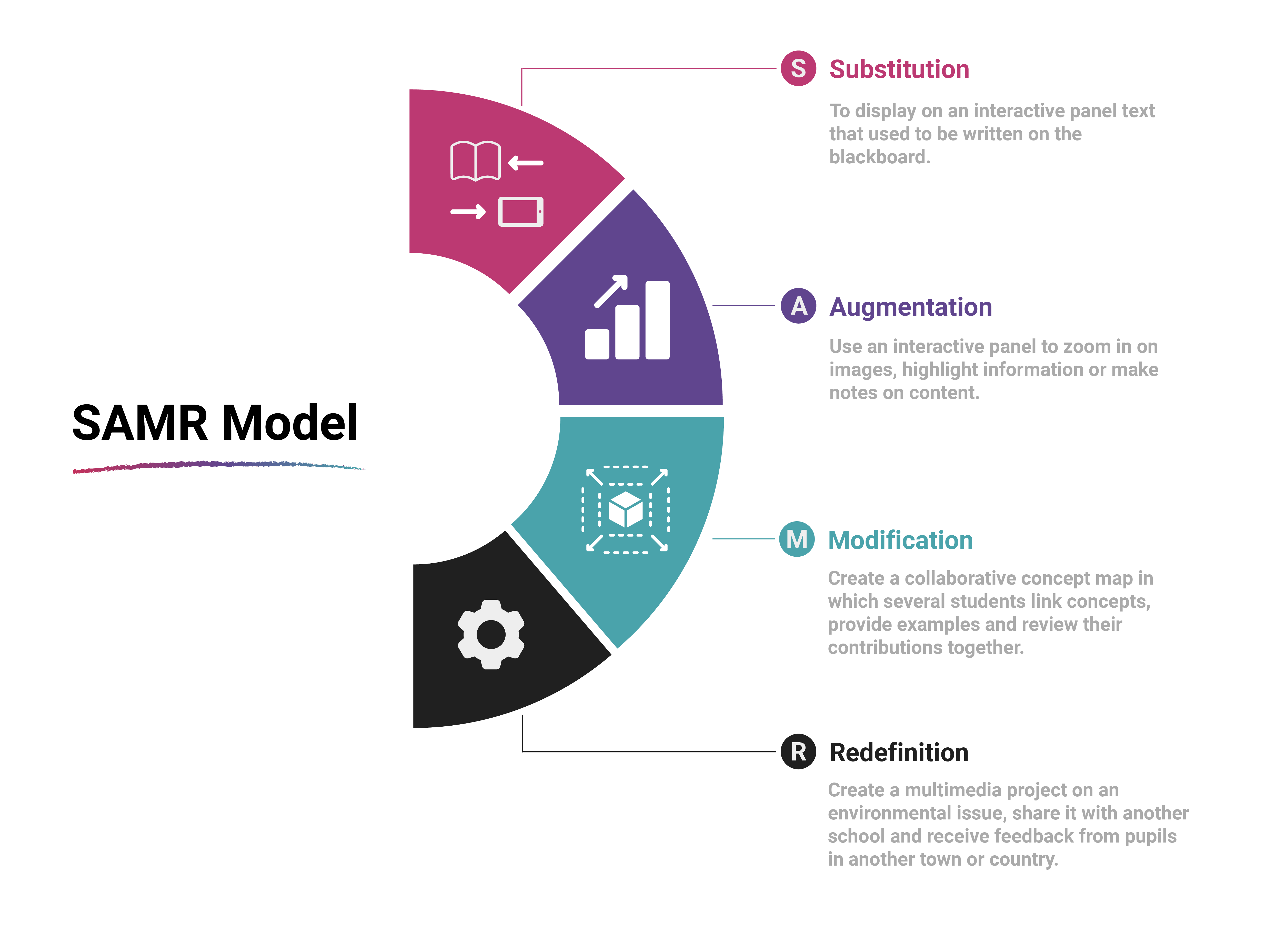
Its name comes from the English terms Substitution, Augmentation, Modification and Redefinition.
These four levels describe different ways of using technology in the classroom according to how it affects educational activities.
The model is divided into two broad categories:
- Enhancement: includes substitution and augmentation. Technology replaces traditional tools or introduces functional improvements.
- Transformation: includes modification and redefinition. Technology enables activities to be redesigned or creates new learning opportunities.
The aim is not to use technology for its own sake, but to consider what it adds to each activity and how it can support educational goals.
The SAMR model can therefore be a starting point for assessing how available resources are used and moving towards a more thoughtful integration of ICT, planned around the real needs of students and teachers.
What are the four levels of the SAMR model?
The four levels of the SAMR model help us identify different ways to integrate technology into education. To understand the differences, it is useful to examine what defines each level and how it can be applied in the classroom.
1. Substitution: using technology as an alternative to a traditional tool
At the substitution level, technology replaces a conventional resource without significantly changing the activity.
The medium changes, but the task remains essentially the same.
Examples of substitution in the classroom:
- Projecting on an interactive display text that used to be written on the board.
- Reading a digital book instead of a printed copy.
- Giving students a PDF worksheet to complete without changing the activity.
- Showing a digital presentation that repeats content previously explained through notes or transparencies.
In these examples, technology makes materials easier to access, read or distribute. However, the main learning process remains exactly the same.
So, as ICT coordinators, what should we ask ourselves?
Does substitution make content easier to access, save time or meet a specific need?
Although this is the most basic level of the model, replacing a traditional resource can be the right decision when it serves an educational goal.
2. Augmentation: improving an activity with digital features
At the augmentation level, technology serves a similar purpose to the traditional resource but adds functional improvements that make the activity easier to carry out.
The difference lies in using the digital tool's capabilities to enrich learning.
Examples of augmentation in the classroom:
- Using an interactive display to enlarge images, highlight information or annotate content.
- Adding self-marking questions to a digital activity so students can check their answers.
- Adding audio, subtitles or visual resources to teaching material to make it easier to understand.
- Using digital tools to organise students' answers and spot errors more quickly.
In these situations, the activity keeps its main purpose, while technology adds features that can improve teaching and learning.
So, as ICT coordinators, what should we ask ourselves?
What specific improvement does technology provide? Does it support understanding, participation, accessibility or feedback?
ICT integration is most useful when it addresses an identified need instead of merely adding digital tools without a clear purpose.
3. Modification: redesigning an activity through technology
The third level arises when technology enables an educational activity to be significantly redesigned.
Rather than simply improving an existing task, it changes how students work, participate, organise information or collaborate to meet learning goals.
Examples of augmentation in the classroom:
- Creating a collaborative concept map where several students connect ideas, add examples and review one another's contributions.
- Analysing a problem in groups using shared documents, with each team adding information and receiving comments from classmates.
- Designing a formative assessment activity in which the teacher gathers responses from the whole class and adapts the explanation to difficulties identified.
- Creating a joint presentation that brings together text, images, videos and documentary sources to explain a topic.
In these cases, technology allows the activity and student participation to be organised differently.
So, as ICT coordinators, what should we ask ourselves?
How does adding technology change the activity? Does it make collaboration, reviewing work or sharing information easier than before?
The value of this level lies in redesigning the task, not in the number of tools used.
4. Redefinition: creating new learning opportunities
At the redefinition level, technology makes it possible to propose new activities that could not previously be done, or would have been very difficult to carry out.
It expands students' opportunities to create, collaborate and communicate.
Examples of augmentation in the classroom:
- Creating a multimedia project about an environmental issue, sharing it with another school and receiving input from students in another town or country.
- Producing a documentary with interviews, images, narration and data collected by students, then publishing it for a real audience.
- Developing an interactive virtual exhibition where students present their research and other groups can explore the content and ask questions.
- Collaborating with a class in another country on a shared investigation, comparing data and building a joint presentation.
In these examples, technology enables educational experiences that go beyond digitising a conventional activity.
So, as ICT coordinators, what should we ask ourselves?
What new learning opportunities does technology offer? Does it allow students to create, share or collaborate in ways that were not previously available under similar conditions?
Redefinition is not about using the most advanced tool, but about making use of it to create meaningful educational experiences.
The SAMR model and the integration of ICT into education
Integrating ICT into education means more than bringing devices or applications into the classroom. It involves deciding how and why to use them, taking account of learning goals, students' characteristics and the school's context.
In this sense, the SAMR model provides a structure for analysing technology use and considering possible improvements.
For example, an interactive display can project the same content that used to be written on a conventional board. In that case, technology replaces an existing resource.
However, it can also support activities where students organise concepts, share their ideas, solve problems and explain their reasoning. Depending on the activity design, technology can enable a deeper change in the learning process.
This shows that a device's educational potential depends not only on its technical features but also on how it fits into the teacher's methods and the opportunities it offers students.
To assess ICT integration in a school, it is useful to consider three aspects:
- Teaching goals: what students should learn and the role technology plays in achieving this.
- Teacher skills and training: what knowledge and resources teachers need to design suitable activities.
- Evaluating outcomes: what evidence shows whether technology use is helping achieve the intended goals.
The SAMR model can help structure this reflection, although it does not replace a full assessment of educational needs or determine the quality of an activity on its own.
Examples of the SAMR model applied to the same activity
One simple way to understand the model is to see how the same activity can evolve depending on how technology is used.
Imagine that the goal is for students to understand a topic, identify its main concepts and be able to explain them.
| SAMR levels | Practical example | What changes? |
|---|---|---|
| Substitution | The teacher projects notes instead of writing them on the board. | The medium changes, but the approach remains the same. |
| Augmentation | The teacher adds zoomable images, annotations and interactive questions to check understanding. | Functional improvements are added. |
| Modification | Students build a shared concept map, link ideas and review their classmates' contributions. | The activity is redesigned through collaboration. |
| Redefinition | Students create a multimedia explanation, share it with another class and improve it using the feedback they receive. | New opportunities for creation and communication are added. |
This example shows that one educational goal can be approached in different ways. The choice depends on the activity's purpose, students' characteristics, available resources and the time needed.
An activity is not necessarily better because it is at a higher level. A simple explanation may be best for introducing a concept, while a collaborative project may be more suitable for exploring it in depth.
The SAMR model helps analyse the possibilities, but it does not replace the teacher's professional judgement.
What role does the SAMR model play for ICT coordinators?
For ICT coordinators, the SAMR model can be a useful tool for gaining a broader view of the school's technology.
Technology planning should go beyond checking how many devices there are, whether they are up to date or whether they work. It also matters how they are used and whether they meet the real needs of teachers and students.
The model can help guide this reflection in several areas.
Assessing how technology resources are used. Examining how interactive displays, devices and applications are used helps identify whether they meet teachers' needs and what other possibilities could be explored.
Identifying training needs. If resources are mainly used to display materials, practical training in interactive features, formative assessment or collaborative activities may be useful. Training should start from the teaching team's real needs.
Guiding technology planning. Knowing which activities the school wants to develop helps identify the features and resources it needs. Purchasing decisions can then be tied to specific educational goals.
Encouraging the exchange of good practice. Sharing experiences among teachers helps identify successful activities, discover new ways to use resources and adapt them to different subjects.
The SAMR model is neither a technical audit tool nor a system for evaluating individual teachers' performance. It can complement an analysis of educational needs, but should be used with each school's context, infrastructure, available resources and goals in mind.
Ultimately, the aim is to use technology with educational purpose. Before adding a new tool or replacing existing resources, it is worth asking what need we want to address and what improvement we hope to achieve.
At SYNETECH, we believe educational technology should meet schools' real needs. Reviewing how available resources are used is therefore a good first step towards better informed technology decisions.
Is your school making full use of the technology in its classrooms? Analysing activities, listening to teachers and identifying learning needs can help you find opportunities for improvement.